The Offline Conversions Your SEO Report Can't See
Calls, direction requests, broken forms and slow replies never reach GA4 or Search Console. Here's how to find the conversions your SEO report misses.
Bradley Benner of Semantic Mastery described his tree-service clients better than any persona doc I've read: "they don't know anything about local SEO nor do they care. They just want their phone to ring." That's the conversion. And for most local businesses, it's the one conversion the SEO report can't see.
This week I audited two of them, an HVAC contractor and a two-location clinic. Both had Google Analytics 4. Both had Search Console. Neither report showed where the money came from. Here's what was hiding, and how you'd find it on your own sites or your clients'.
Offline conversions never reach GA4 unless someone carries them there
GA4 records what happens in a browser, on your domain, with a tag that fires. That leaves out a lot of how a local customer actually converts:
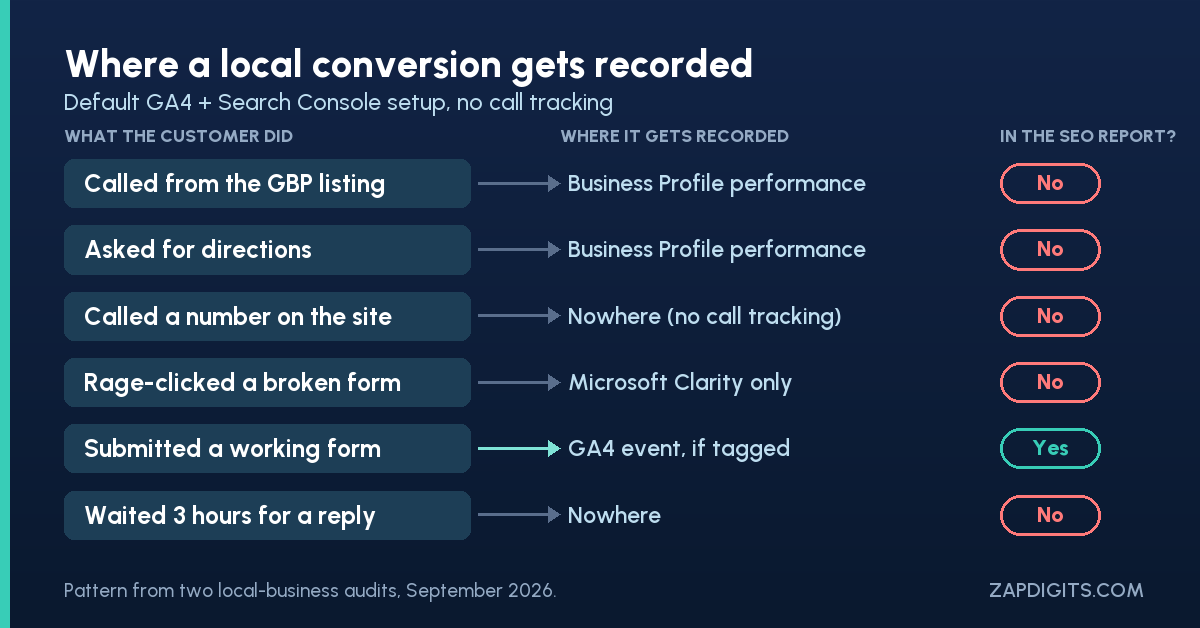
- A call placed straight from the Google Business Profile listing
- A tap on "Directions," followed by a drive to the shop
- A phone call from a number the customer copied off the site
- A form that looked like it sent, and didn't
- A lead who called, reached voicemail, and called the next company
Search Console is worse for this. It stops at the click. Everything after the click belongs to somebody else's report, and a lot of it belongs to no report at all.
So when a client says "SEO isn't producing leads," skip the rankings for a minute and ask: where would a lead show up if SEO produced one?
Google Business Profile calls and direction requests live in another report
For the HVAC contractor, the Business Profile performance report showed 531 calls and 389 direction requests between April and September 2026, plus 255 website clicks. None of those calls or direction requests exists in GA4 or Search Console. They live only in Business Profile performance, which most SEO reports never open.
The clinic was a different flavour of the same problem. It had two locations with two listings, and the one event its GA4 tracked was a tap on the phone link. GA4 was also installed twice, once hard-coded and once through Tag Manager, which likely double-counts page views. So the traffic line was inflated, and the conversions line only counted one of several ways a patient could book.
If you manage local clients, the fix is boring and it's worth more than a month of link building: pull Google Business Profile data into the same report as Search Console and GA4, and put calls and direction requests next to organic clicks. A local SEO report without them is reporting on the smallest part of the funnel.
Call tracking is where local SEO conversions actually land
Isaac Justesen of PatientPartners works with clinics, and he's seen what happens to calls once they arrive. You'd be blown away, he told me, at:
He's just as blunt about measurement: conversion tracking, he said, is "so important to be able to tell what part of your marketing is working and what's actually driving results. And seldom is that set up correctly as well."
Call tracking closes the loop. Matthew Slaymaker of Slaymaker Marketing uses tools like CallRail and WhatConverts once call volume justifies the cost, to answer the questions a client actually has:
Two setup rules, so organic doesn't get robbed of credit:
- Use a tracking number on the website for organic visitors (dynamic number insertion), and a separate one on the GBP listing, with the real number kept as the listing's secondary number so your citations stay consistent.
- Send the call data somewhere the SEO report can read it. A CallRail connection puts calls by source next to sessions by source, and that's the view that ends the "SEO doesn't produce leads" conversation.
Rage clicks in Microsoft Clarity show which forms ate the lead
This is the one that surprised me. On the HVAC contractor's contact page, Microsoft Clarity's heatmap showed about 39 clicks and taps on the Send button between late June and late September. GA4 recorded one form_submit on that page over the same stretch. One.
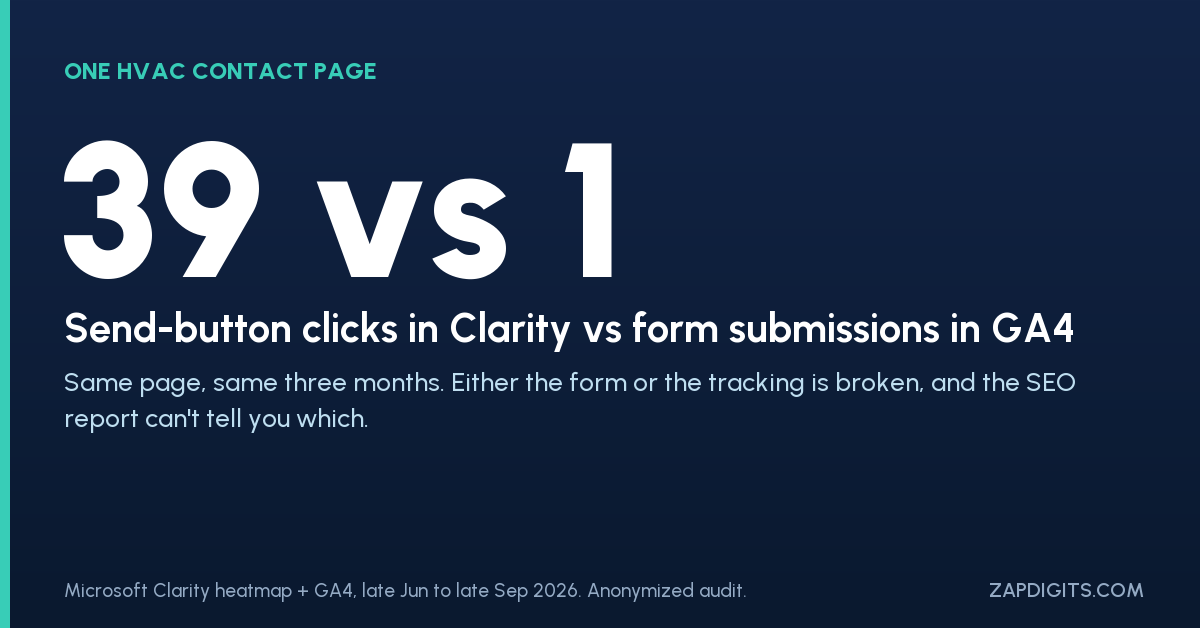
Either the form is failing, or the tracking is. I don't know which yet, and that's the point: the SEO report couldn't have told anyone. It showed a contact page with traffic and no conversions, which reads as "the page doesn't convert." The heatmap says people tried.
Clarity is free, and it flags this for you. A rage click is Microsoft's name for what happens when a user "clicks multiple times in a clustered area in rapid succession," usually on something that should work and doesn't. Dead clicks are clicks on things that don't respond at all. On a lead-gen site, filter recordings to your contact and booking pages, sort by rage clicks, and watch five sessions. You'll know more about your conversion rate than a month of GA4 charts will tell you.
The same site had 93 form starts and 3 submissions in 90 days. That's not an SEO problem. It's a leak you'd only find by looking past the report.
Speed to lead decides whether the conversion was worth anything
Say the call gets tracked and the form works. There's still one more place a conversion dies: the reply.
Ignitvio's Lead Response Study mystery-shopped 1,824 local businesses across five metros and five trades. 68% never responded within 24 hours. The median reply took 68 minutes, only 5% answered within five minutes, and 88% followed up once and never again.
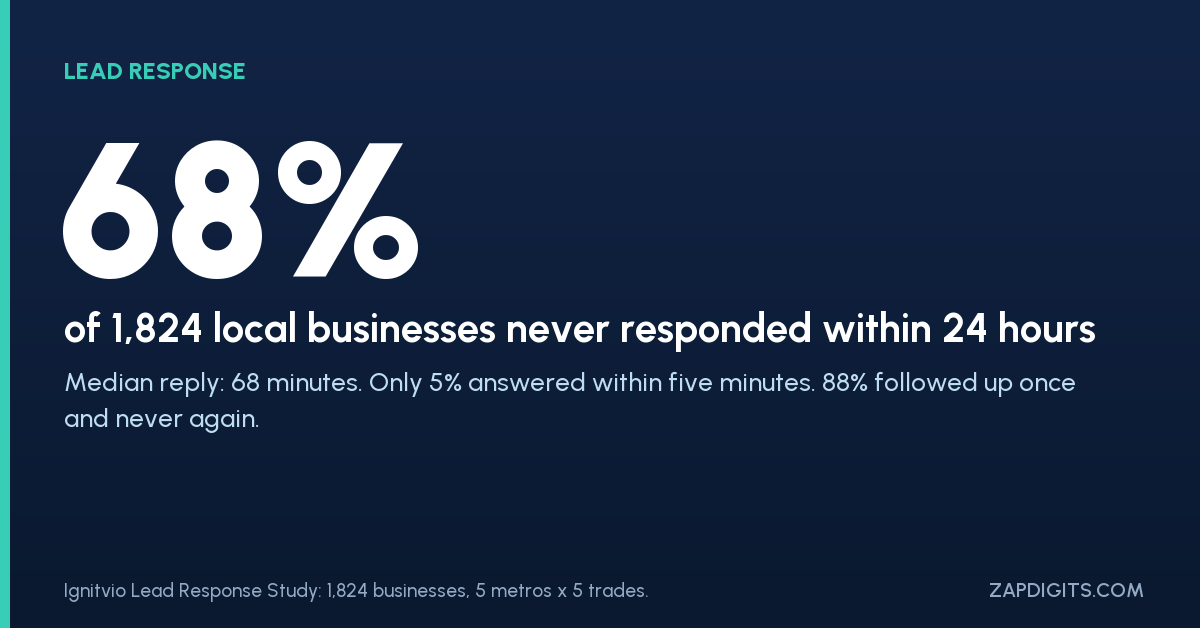
Now think about what that does to your SEO report. You rank, the lead comes in, nobody calls back for three hours, and the lead books a competitor. The client decides the leads were bad. Alex Radetic of Nuvo Agency hears this constantly:
I wrote about this gap in more detail in the black hole after the conversion. The short version: before you accept "bad leads" as a verdict on SEO, measure how fast the leads got a reply.
What to add to the report this month
You don't need a new stack. You need the report to look in the places where local customers actually convert:
- Business Profile calls, direction requests and website clicks, per location, next to organic clicks.
- Calls by source from call tracking, with answered vs missed.
- Form starts vs form submits, plus a monthly Clarity check of rage and dead clicks on contact and booking pages.
- Response time on inbound leads, even if it's a manual sample of ten.
- A tag audit: is GA4 installed once, and does every conversion path fire an event?
Then read the report again. How much of what you called "SEO underperforming" was a phone nobody answered?
For a broader look at what should sit in a client report, what should I track is a good checklist to hold this against.